
- People
- Insights
-
Industries
What are your needs?

When you’re looking for an advisory partner to help you simplify your industry’s unique complexities, PBMares has you covered.
-
Services
How can we help you?

Move forward with confidence and clarity, guided by a team of advisors dedicated to helping you reach your goals.
-
About
Get to Know PBMares

Innovation, agility, adaptability, and a drive to succeed are embedded in our culture. See yourself here.
-
Contact Us
Get in Touch

Have questions or need to get in touch with one of our offices? We’re here to help.
- Clients
- Payments
- Request for Proposal
- Search

Individuals
Tax Time, Simplified
Gathering documents for your tax return can be a chore. This tax season, we’re excited to share a complimentary tool to simplify and reduce the stress of preparing your taxes.
It’s called TaxCaddy, and it will help you easily gather documents, communicate directly with us, and track your return’s progress all in one place. If you still have questions after reviewing the resources on this page, please reach out to taxcaddy@pbmares.com.

TaxCaddy
TaxCaddy is a streamlined way for individual taxpayers to gather and share tax forms and related documents. It’s in an interactive format that connects you to your PBMares tax professional. TaxCaddy has a mobile app that’s available to download from your phone’s app store at no charge. From within the app, you can digitally scan and upload documents, automate the document retrieval process, and more.
TaxCaddy requires an account setup. Email taxcaddy@pbmares.com if you’re not enrolled yet.
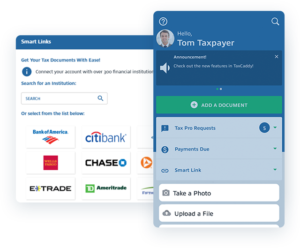
Source: https://corp.sureprep.com/products/taxcaddy
TaxCaddy External Links & Resources
E-File Form 8879 Submissions
If you are interested in returning your Form 8879 electronically, please follow the instructions detailed below. Please note these instructions have been updated to reflect the recent switch from ShareFile to Box.
Instructions
- Click the button below to securely upload your signed E-File Form 8879 to PBMares.
- Enter your first and last name or Company (when applicable) and your email address.
- Enter the Type of Document you are uploading from the drop down list.
- Enter any comments you feel may be helpful into the “Additional Information” field.
- Drag and drop your e-file form(s) from your computer to the “Drag and drop files” section or click on “Select Files”.
- Once all files are listed, click the Submit button.
- Wait for the “Success! Your file has been submitted.” before closing the window.
- Once your documents are received, you will receive a confirmation email by the end of the business day.